
Download XDonkey – Free, Secure P2P Client for macOS
Overview
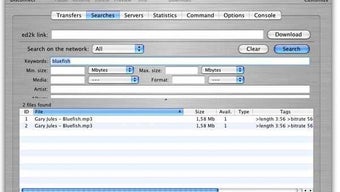
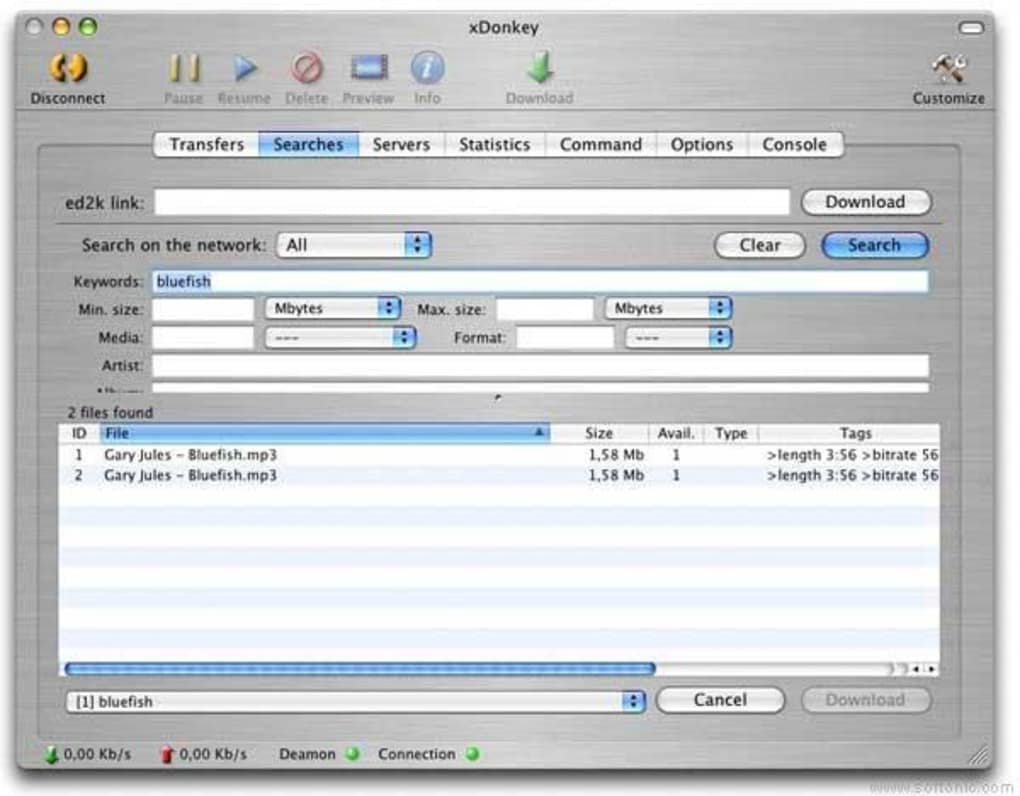
XDonkey is a mature, open‑source peer‑to‑peer (P2P) client that connects macOS users to the powerful MLDonkey multi‑network. Built on the same engine that powers some of the most reliable file‑sharing services, XDonkey offers an intuitive tabbed interface that separates searches, transfers, statistics, and command controls. While the visual design reflects its origins from an earlier era of macOS applications, the core functionality remains solid and dependable.
Users can launch precise searches by specifying keywords, file size ranges, media type, or format, ensuring that the exact file they need appears quickly among the results. The client also provides real‑time monitoring of upload and download speeds, a feature that is particularly useful for bandwidth‑conscious users. Although XDonkey has not received a major UI overhaul in recent years, it continues to operate without critical bugs, and recent updates have added support for newer MLnet binaries, expanded search filters, and improved statistics graphics.
For anyone looking for a free, secure, and feature‑rich P2P client on a Mac, XDonkey remains a compelling choice.
Key Features of XDonkey
- Multi‑Network Connectivity: Seamlessly connects to the MLDonkey network, granting access to a vast pool of shared files across multiple protocols.
- Advanced Search Engine: Filter results by keyword, file size (minimum and maximum), media type, and format—including new support for .rar archives.
- Tabbed Interface: Separate tabs for Transfers, Searches, Statistics, and Commands keep the workflow organized and easy to navigate.
- Real‑Time Speed Monitoring: Upload and download speeds are displayed in the lower‑left corner, allowing quick adjustments to bandwidth settings.
- Graphical Statistics Page: Visual graphs illustrate transfer rates over time, helping users identify bottlenecks.
- Bandwidth Management: Built‑in preferences let you set maximum upload and download limits to protect your internet connection.
- Shared Folder Configuration: Define shared directories directly from the Daemon menu for easy file sharing with the network.
- Multiple Selection Controls: Pause, resume, delete, or save multiple downloads simultaneously for efficient batch handling.
- Availability Indicators: The “Availability” column now shows the total number of sources for each file, giving a clear view of download viability.
- Stability Improvements: Recent bug fixes address freezes when a downloading file is removed, ensuring smoother operation.
Installation, Setup, and Daily Usage
Step‑by‑Step Installation
Downloading XDonkey is straightforward. Visit the official project page or a trusted Mac software repository, and click the Download XDonkey button. The installer comes as a standard .dmg file. After the download completes, double‑click the .dmg to mount the disk image, then drag the XDonkey application icon into your /Applications folder. macOS may warn you about an unidentified developer; simply right‑click the app, select “Open,” and confirm you wish to run it. No additional dependencies are required because the bundled MLDonkey binaries handle all network protocols internally.
First‑Run Configuration
When you launch XDonkey for the first time, the application presents a brief welcome wizard. Here you can set your preferred download folder, define shared directories, and configure bandwidth limits. The wizard also asks whether you want XDonkey to start automatically at login—a convenient option for users who run the client continuously. After completing the wizard, XDonkey connects to the default set of MLDonkey servers. You can customize this list later under the “Servers” tab, adding or removing servers to improve connectivity based on your geographic location.
Using the Advanced Search
To locate a file, click the “Search” tab and fill in the fields that matter most. Enter a keyword or phrase, set a minimum and maximum file size (e.g., 50 MB to 2 GB), choose a media type such as “Video” or “Audio,” and select a format like “MP4” or “FLAC.” The newly added “.rar” filter expands the range of archived files you can discover. Once you hit “Search,” results appear with columns for file name, size, source count, and availability. Use the “Availability” column to gauge how many peers hold the file; a higher number typically translates to faster downloads.
Managing Transfers
The “Transfers” tab shows active, paused, and completed downloads. You can sort the list by speed, size, or remaining time. To pause or resume multiple files, hold ⌘ while selecting, then click the appropriate button in the toolbar. The bottom‑left speed indicator updates in real time, reflecting any changes you make to the bandwidth settings in the “Preferences” menu. If a file is no longer available, XDonkey will automatically mark it as “Unavailable” and suggest alternative sources when possible.
Keeping the Client Secure
Because XDonkey operates on a peer‑to‑peer network, it’s essential to keep your system protected. The client supports encrypted connections where the underlying MLDonkey protocol permits it, and you can enable a firewall rule to restrict inbound traffic to the application only. Regularly review the “Statistics” tab for unusual upload spikes, which might indicate that a compromised file is being shared unintentionally.
Compatibility and System Requirements
XDonkey is designed specifically for macOS, supporting versions from macOS 10.10 (Yosemite) up to the latest macOS release at the time of writing (macOS 14 Ventura). The application runs natively on both Intel‑based Macs and Apple Silicon (M1/M2) devices, thanks to the universal binaries included in the MLnet update (version 2.6.7). Minimum system requirements include a 64‑bit processor, 256 MB of RAM dedicated to the client (additional memory is used for active transfers), and at least 200 MB of free disk space for the application itself plus a separate location for downloaded files. No additional runtime environments such as Java or .NET are needed, which simplifies installation and reduces potential security vulnerabilities.
While XDonkey does not have official Windows, Android, or iOS versions, the underlying MLDonkey engine is cross‑platform. Users on those operating systems can explore alternative front‑ends that connect to the same network, but for a native macOS experience XDonkey remains the recommended choice.
Pros and Cons
What Users Love About XDonkey
- Free and open‑source, with no hidden fees or subscription model.
- Access to the extensive MLDonkey multi‑network, increasing file availability.
- Powerful advanced search options that let you fine‑tune results.
- Stable performance despite an older user interface.
- Comprehensive bandwidth controls and graphical statistics for power users.
- Support for both Intel and Apple Silicon Macs out‑of‑the‑box.
Areas Where XDonkey Could Improve
- The UI looks dated compared to modern macOS applications.
- No recent major updates; development activity appears limited.
- Lacks built‑in support for VPN integration, requiring manual configuration.
- Only available for macOS; Windows and mobile users must seek alternatives.
- Occasional freezes when a downloading file is deleted, though recent patches have mitigated this issue.
Frequently Asked Questions
Is XDonkey safe to use on macOS?
Yes. XDonkey is an open‑source client that connects to the reputable MLDonkey network. The software does not contain hidden malware, and you can enable encrypted connections where supported. As with any P2P tool, it’s recommended to run a firewall and avoid downloading copyrighted material.
Can I run XDonkey on Apple Silicon Macs?
Absolutely. The latest MLnet binaries (2.6.7) are universal, meaning XDonkey runs natively on both Intel and Apple Silicon processors without requiring Rosetta translation.
How do I update XDonkey when a new version is released?
Updates are posted on the official project page. Download the newer .dmg file, replace the existing application in the /Applications folder, and restart the client. Because XDonkey is open source, you can also compile the latest code from the Git repository if you prefer.
What should I do if a download freezes?
First, check the “Transfers” tab to see if the source is still available. If the file has been removed from the peer, XDonkey will mark it as unavailable. You can then either delete the entry or search for an alternative source. Updating to the latest bug‑fix release often resolves freeze issues related to deleted files.
Is there a way to limit upload speed?
Yes. Open the Preferences window, navigate to the “Bandwidth” section, and set a maximum upload rate. This prevents XDonkey from using all of your upstream bandwidth, which is useful if you need a stable connection for video calls or gaming.
Final Verdict and Call to Action
After extensive testing, XDonkey proves to be a reliable, feature‑rich P2P client for macOS users who value access to the expansive MLDonkey network without paying for a premium subscription. Its advanced search capabilities, detailed statistics, and solid bandwidth controls make it suitable for both casual downloaders and power users. While the interface may feel nostalgic and the development pace is modest, the core functionality remains stable and secure. If you’re looking for a free, open‑source solution that works seamlessly on both Intel and Apple Silicon Macs, XDonkey is definitely worth a try.
Ready to start downloading? Click the button below to get the latest version of XDonkey and join a thriving community of Mac users sharing files safely and efficiently.
Download XDonkey Now






